Justus Hörberg

Chaos in Wonderland
"Chaos in Wonderland" is the title of an old platformer/beat'em-up game I worked on back in 2019. The game follows a young girl armed with two large scythes, with which she is destined to reap the evil that has taken over the wonderland she has fallen into. The game features an intricate combat system that heavily focuses on combos and ways to extend them, as well as basic platform mechanics such as wall jumping and dashing, both of which also find use in combat.
Platform: PC
Engine: Unity
Language(s): C#
Project Created: February 2019
Team Size: 1
Info
Project Information
Chaos in Wonderland is a solo-developed game made in Unity. Development spanned between February-July 2019, and was worked on during off-hours from my work at the time. All assets, including 3D models, environments, animations and code (with the exception of some textures and sounds) have been made from scratch, using Unity and Blender.
Technical Features
Dashing
By pressing the X-button, the player can perform a short dash. This can be used to move faster and cross wide gaps that normal jumps cannot clear. Pressing the A-button while dashing allows the player to enter a spin jump, a high-speed jump that gains more height than a standard jump. The dash can also be used in combat, both to extend combos, as well as to simulatenously attack groups of enemies packed together.


Wall Jumping
When the player gets in contact with a wall, they will start sliding it down. If they press the A-button at this point, they can jump away from it, and repeat the process on an opposite wall if they want. If the player presses the A-button on impact from a spin jump, they can perform a "wall parry," which launches the player even further and also damages nearby enemies.
Combat
The player's main methods of attacking are found in the B and Y-buttons. Each of them have their own attack animations, where the B-button involes one scythe, and the Y-button two. Both attack types can be combined with each other, depending on if one attack animation will hit the enemy or not. Internally, when the player attacks, an AnimationEvent in the animation will activate the appropriate attack data, which in turn activates the correct hitboxes, and gives them the correct damage/knockback value. If the B or Y-buttons were pressed during an attack animation, the next slash is buffered.


Gravity
The gravity mechanic works by having a quaternion representing the direction of the gravity. All speed values and rotations are first calculated in "local" space, and are multiplied by the gravity quaternion before being applied to the character. This results in all position updates being performed relative to whichever is their currently the downwards vector.
Hitbox System
There are three types of interactable boxes in the game: hitboxes, grabboxes and hurtboxes. The hitboxes are always child objects to bones of a character, and contain a reference back to a component that handles hitboxes' damage data. When activated, hurtboxes that come in contact will receive this information, and signal to the recipient they are connected to that they have been hurt, as well as how much damage and knockback they took. Grab boxes work in a similar way, but instead of dealing damage, they signal the grabber that they have grabbed something, and the grabee that they have been grabbed.

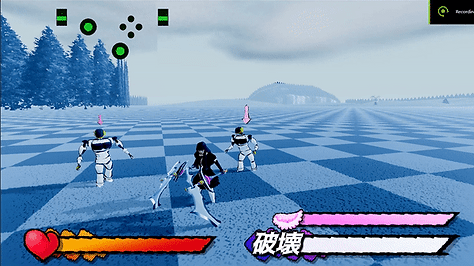
Lock-On System
When the player presses the LT-button, the camera will lock on to the nearest enemy. This works by first overlapping a sphere around the player's current position for objects labeled enemies. If enemies were found, the game will proceed to detect which enemy is the closest to the player by checking the distance to each enemy, and the one closest will be targeted.